Your WooCommerce store gets orders. That part works. But you still pack every box, answer every email, and fix every problem yourself. You work harder each month, yet your profit barely moves.
Here is the good news: you do not need a big team or a big ad budget to break out of this.
In May 2025, a small toy store was close to giving up. It made its WooCommerce store faster, and revenue jumped 150% the next month. A seasoning brand that began with one man selling at road shows now gets about 4,000 orders a month on its WooCommerce store. Neither of them started big.
In this guide, you will get:
- The 9 steps to scale a WooCommerce store, in the right order
- A 7 point checklist to see if your store is ready right now
- Real numbers from real WooCommerce stores, with a chart
- The 6 mistakes that waste the most money
If you only have one minute, read the quick answer below.
How to scale a small business: the quick answer
To scale a small business, you grow your sales faster than your costs. For a WooCommerce store, that means you fix your product pages and checkout, keep the customers you already have, automate the work you repeat every day, and only then spend more on ads.
Here are the 9 steps in short:
- Check that your store is ready to scale.
- Know your numbers.
- Fix your store speed.
- Make your product pages easy to buy from.
- Make checkout simple.
- Bring customers back.
- Automate the boring work.
- Add one new sales channel at a time.
- Get help before you burn out.
Each step is explained in plain words below, with real store examples.
What does it mean to scale a business?
Scaling means your sales go up a lot while your costs go up only a little. Growth is different. When you grow, sales and costs usually rise together.
Here is a simple example. You sell 100 orders a month and pack them yourself. If you hire two people to pack 200 orders, you grew. If you set up a better process so one person packs 300 orders, you scaled.
| Terms | Growing | Scaling |
|---|---|---|
| Sales | Go up | Go up fast |
| Costs | Go up at the same speed | Go up slowly |
| Your time | You work more hours | You work about the same, or less |
| How it happens | More people, more stock, more money | Better systems, automation, repeat customers |
| Example in WooCommerce | Hire a second person to answer every email | Add a clear FAQ and order tracking so fewer emails arrive |
Online stores are easier to scale than shops on a street. A website can serve 10 customers or 10,000 customers with almost the same setup. That is why WooCommerce owners have a real advantage here.
Is your WooCommerce store ready to scale? A 7 point checklist
Your store is ready to scale when people already buy from you again and again, and your store makes a profit on each order. If you scale a store that loses money on each order, you just lose money faster.
Check each line that is true for your store:
- You get orders every week without running a sale.
- Some customers buy from you more than once.
- You make a profit on each order after product cost, shipping, payment fees, and ad cost.
- You know your best selling products.
- Your store loads fast on a phone.
- You can explain your daily work in simple steps someone else could follow.
- You have enough cash to buy more stock if orders double.
5 to 7 ticks: you are ready. Start with step 2 below.
3 to 4 ticks: fix the missing items first. Steps 2 to 5 will help.
0 to 2 ticks: focus on finding steady customers before you try to scale.
How to scale a small business: 9 steps for WooCommerce stores
Do these steps in order. Each step makes the next one work better. Spending more on ads (step 8) before you fix your store (steps 3 to 5) is the most common way owners waste money.
Step 1: Check that your store is ready
Use the 7 point checklist above. Be honest. A store that is not ready will not scale, no matter how much you spend.
Step 2: Know your numbers
You cannot scale what you do not measure. Track these 5 numbers every month:
| Number | What it means | Where to find it |
|---|---|---|
| Revenue | Total money from sales | WooCommerce, Analytics, Revenue |
| Orders | How many orders you got | WooCommerce, Analytics, Orders |
| Average order value (AOV) | Revenue divided by orders | WooCommerce, Analytics, Overview |
| Conversion rate | Orders divided by visitors | Your analytics tool |
| Profit per order | What is left after all costs | Your own spreadsheet |
Also watch your cash. When orders double, you must pay for stock before customers pay you. Many stores grow fast and still run out of money for this reason.
Step 3: Fix your store speed
A slow store loses sales, and a fast store gets more out of the visitors you already have. This is often the cheapest win of all.
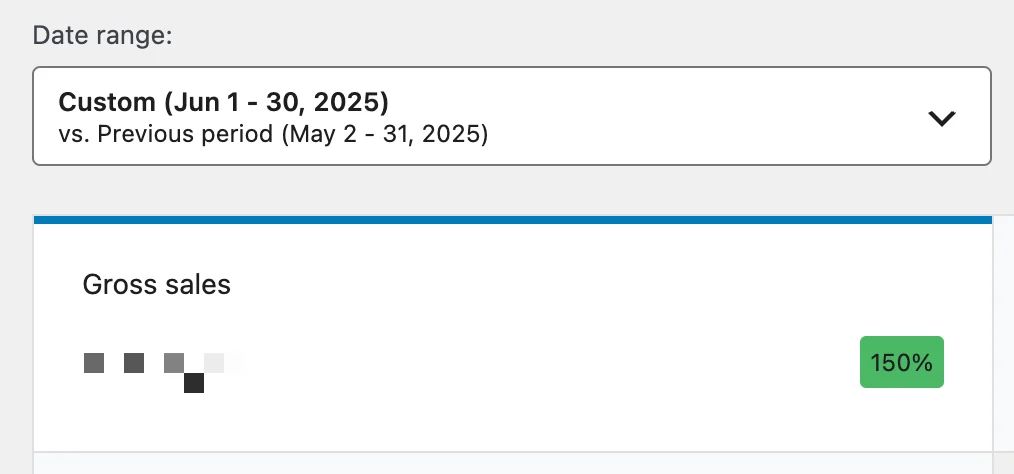
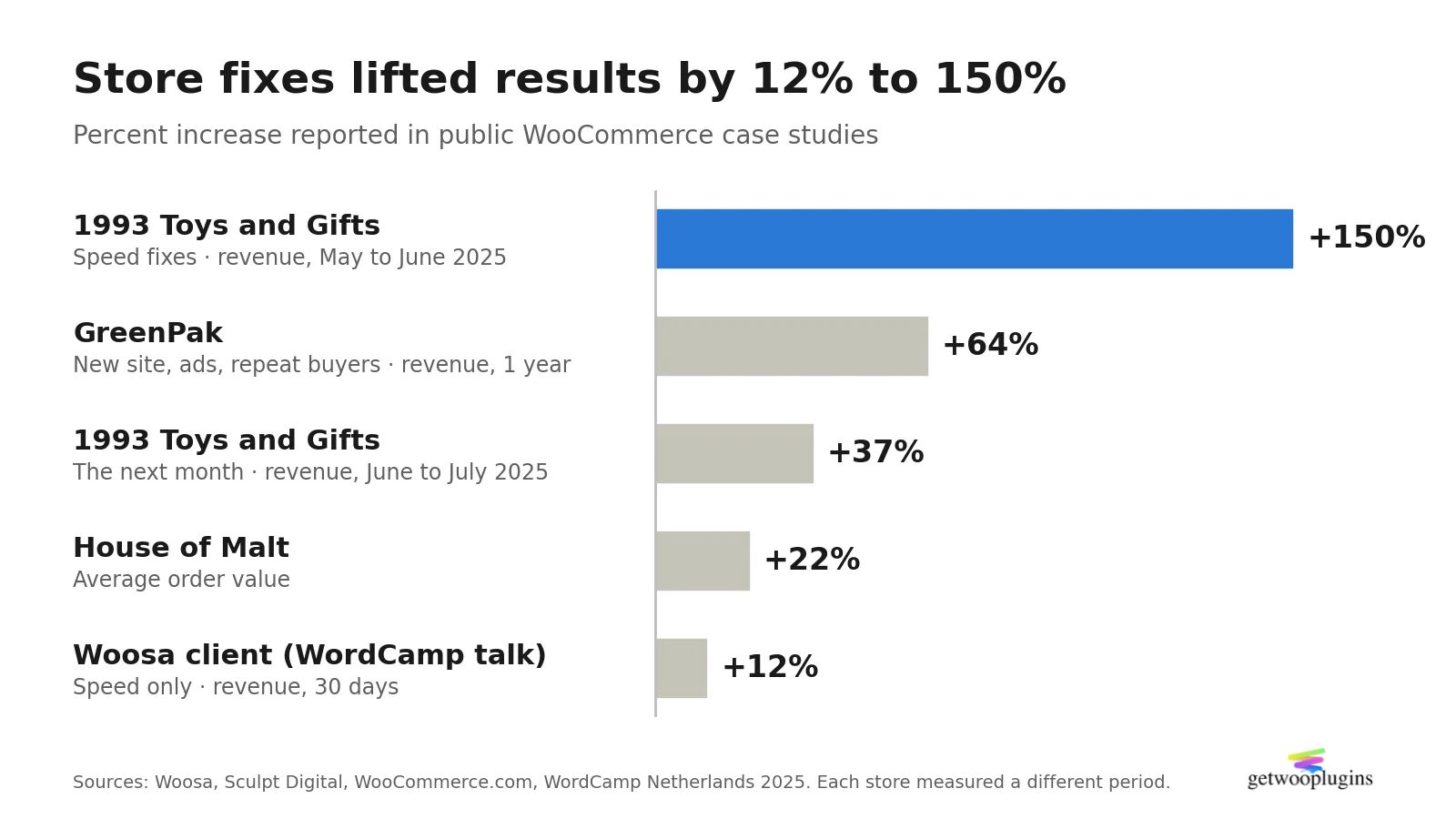
The Dutch WooCommerce agency Woosa helped a toy store called 1993 Toys and Gifts. Its mobile PageSpeed score was 57. The team removed 9 plugins (33 down to 24), turned on caching, turned on WooCommerce High Performance Order Storage (HPOS), and cleaned the database. The mobile score went up to 94, and revenue rose 150% from May to June 2025.
Simple things you can do this week:
- Remove plugins you do not use.
- Use a caching plugin and a good WooCommerce host.
- Turn on HPOS in WooCommerce, Settings, Advanced, Features, if your plugins support it.
- Test your store on PageSpeed Insights before and after each change.
Step 4: Make your product pages easy to buy from
Your product page does the selling when you are asleep. If customers cannot quickly see the color, size, or style they want, they leave.
This matters most when you sell products with options, like a shirt in 5 colors and 4 sizes. By default, WooCommerce shows these options in dropdown menus. Customers must click, read, and guess.
The manual way. Give each variation its own clear photo. Use short, plain names like “Navy Blue” instead of codes. Put a size guide near the options. This works well and costs nothing.
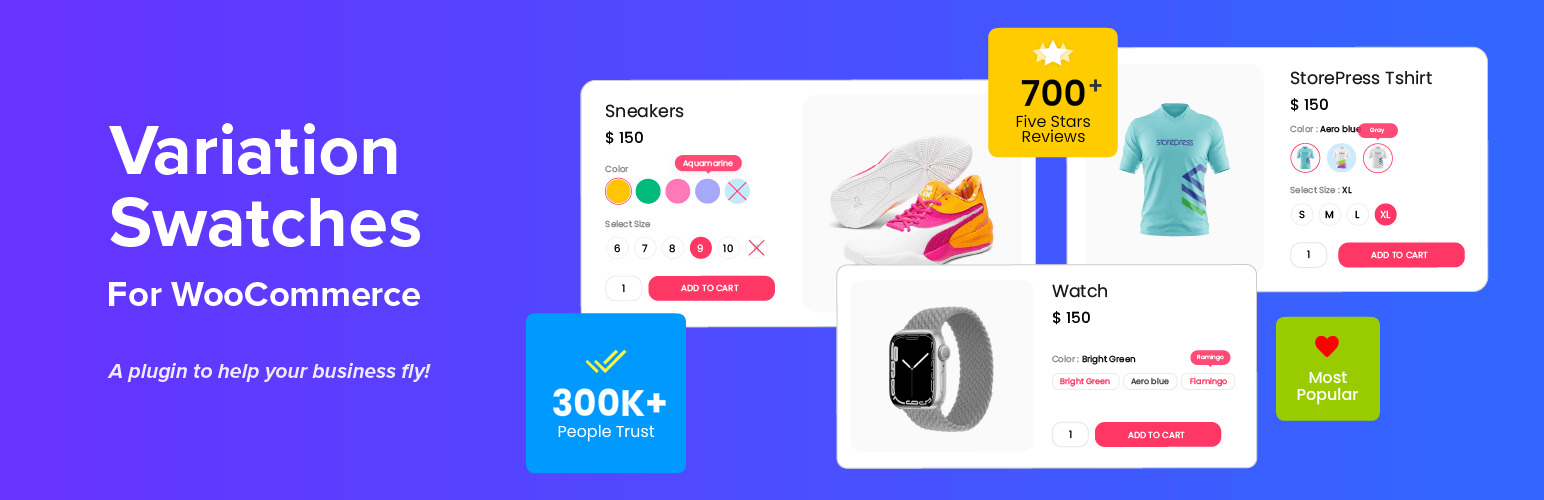
The faster way. A plugin like Variation Swatches for WooCommerce turns those dropdowns into color, image, and button choices that customers can see and tap. It has a free version on WordPress.org with 300,000+ active installs. You can try it on the live demo first.
When manual is fine. If most of your products have only 2 or 3 options, dropdowns with good photos are often enough. A swatch plugin helps most when you have many colors, many sizes, or a large catalog that would take hours to update by hand.
Want to see how this looks? Our guide to WooCommerce color swatches walks through real examples. Out of stock options also slow customers down, so it helps to hide or blur out of stock variations they cannot buy.
Step 5: Make checkout simple
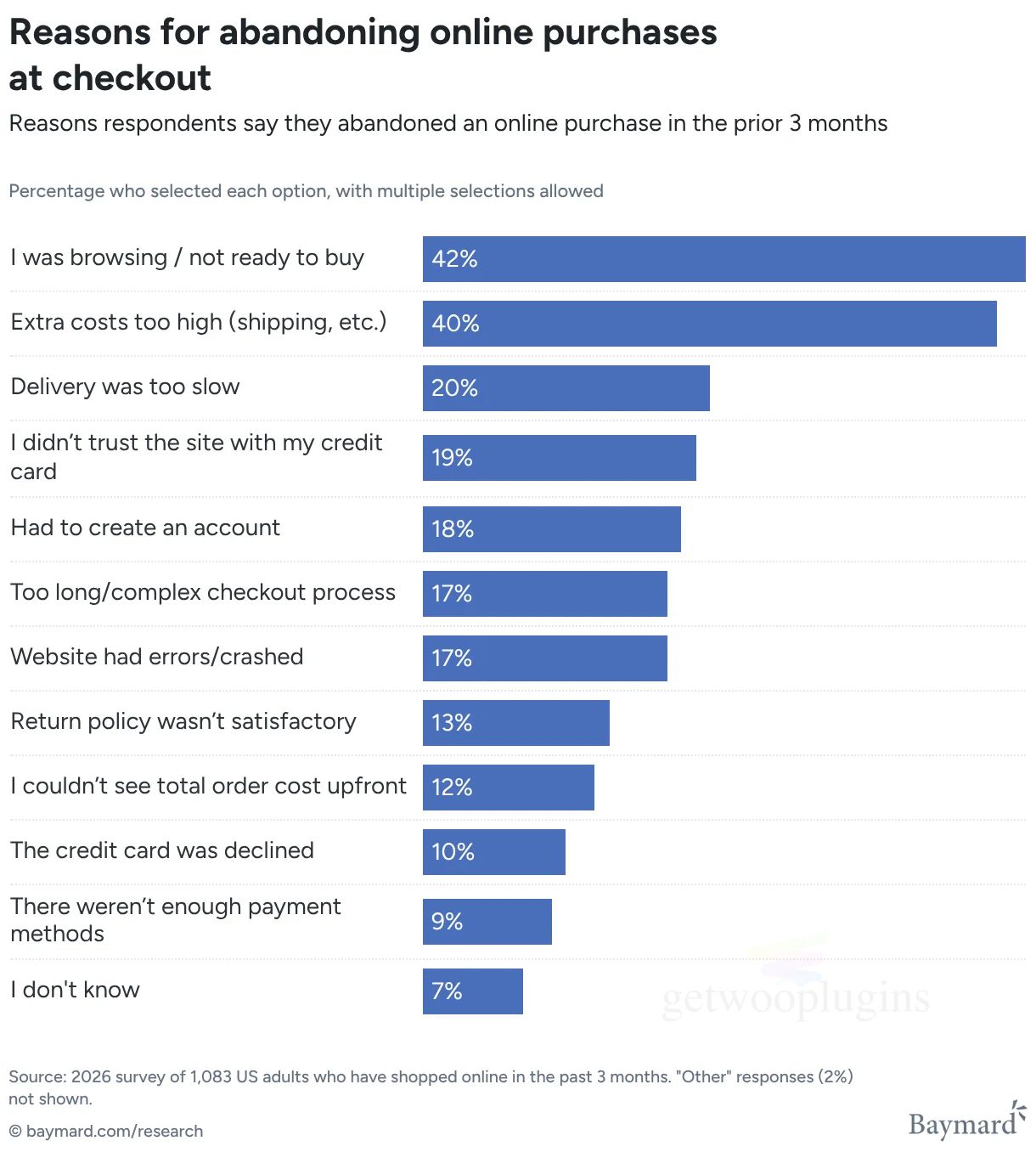
About 70% of online carts are left without buying, based on 50 studies collected by the Baymard Institute. Baymard also found that large stores could raise conversion by about 35% just by improving checkout design. That is free growth from visitors you already paid for.
Quick fixes:
- Show shipping costs early. Extra costs like shipping, tax, and fees are the top reason people leave checkout.
- Allow guest checkout. 18% of customers have left a checkout because the site made them create an account.
- Ask only for the fields you really need.
- Offer the payment methods your customers use most.
Step 6: Bring customers back
A new customer costs you ads. A returning customer costs you an email. Repeat buyers are the cheapest way to scale.
UK packaging supplier GreenPak grew its WooCommerce revenue 64% in a year. Its agency, Sculpt Digital, focused on two things: finding customers who bring profit, and raising how much each customer spends over time.
Ways to do this in WooCommerce:
- Send a thank you email with a small offer for the next order.
- Send abandoned cart emails. These are usually set up once and run on their own.
- Start a simple loyalty or points program.
- Offer subscriptions for products people use up, like coffee or soap.
Step 7: Automate the boring work
Write down every task you do more than once a week. Then ask: can a tool do this? Can someone else do this with a simple guide?
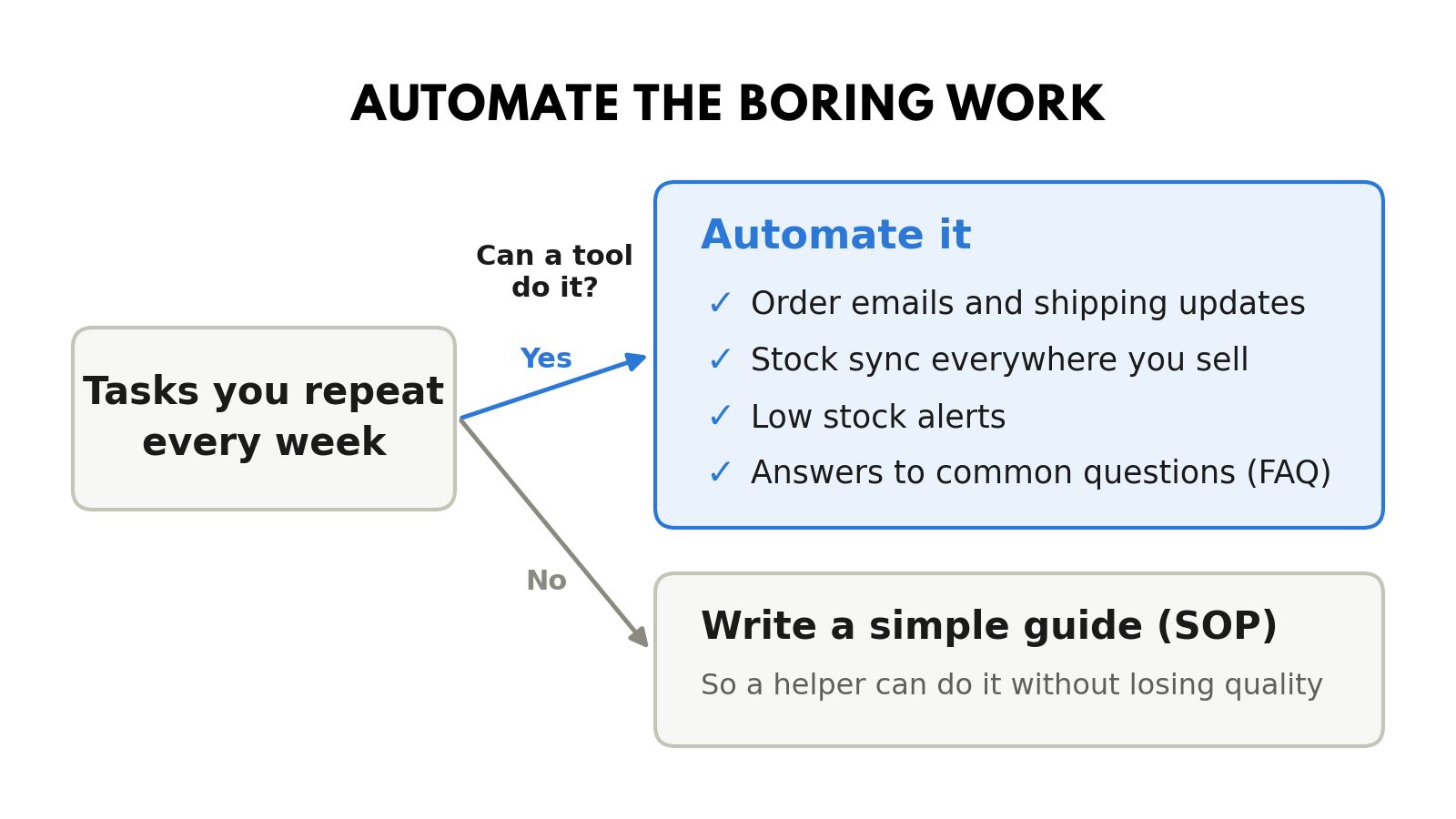
Good tasks to automate in a WooCommerce store:
- Order emails and shipping updates.
- Stock syncing across every place you sell.
- Low stock alerts.
- Answers to common questions, with a clear FAQ page.
For tasks that stay manual, write a short step by step guide. These guides are called SOPs (standard operating procedures). They let you hand work to a helper without losing quality.
Step 8: Add one new sales channel at a time
Once your store converts well, more traffic turns into more profit. Now it makes sense to spend more on ads or open a new channel.
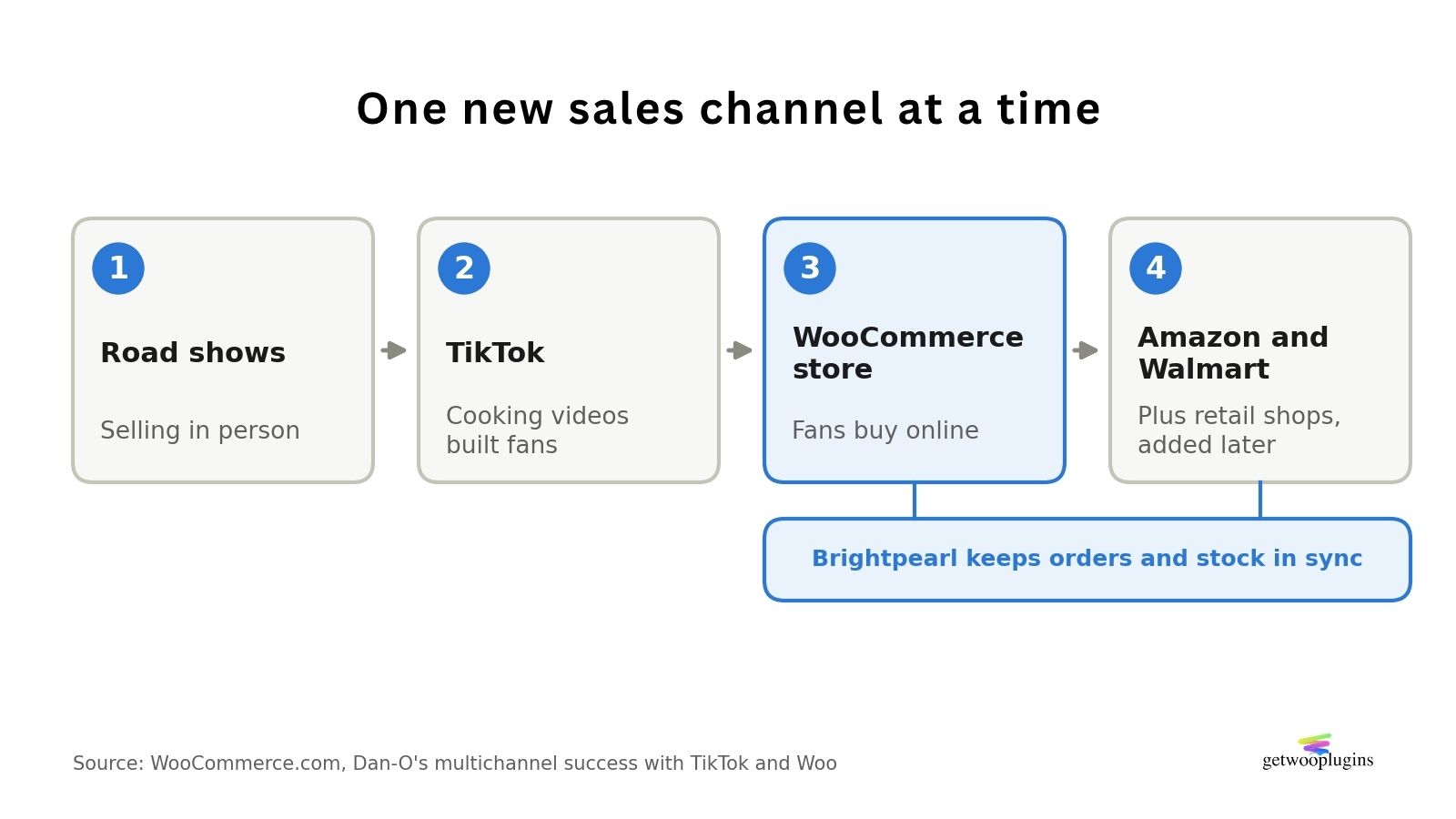
Dan-O’s Seasoning is a famous example. It started as one man selling seasoning at road shows. During the pandemic, Dan started posting cooking videos on TikTok. The business later grew to sell through its WooCommerce store, Amazon, Walmart, and thousands of retail shops. The team uses a tool called Brightpearl to keep orders and stock in sync with WooCommerce across all these places.
The lesson: Dan-O’s did not try every channel at once. It found one that worked (TikTok), linked it to the store, and added more channels later.
Step 9: Get help before you burn out
You cannot do everything forever. Hire or outsource the tasks you are worst at, or the tasks that take the most time.
Common first hires for a WooCommerce store: a part time customer support helper, a packing and shipping helper, or a WooCommerce developer on call. Many owners start with freelancers and hire full time later.
If getting found on Google is your weak spot, an ecommerce SEO agency can take that work off your plate.
Remember the 1993 Toys and Gifts story. The owners said they had little technical knowledge and were close to giving up. Bringing in experts turned the store around in a few weeks.
Real WooCommerce stores that scaled: what the numbers show
Public case studies show the same pattern again and again. The biggest wins came from fixing the store itself, not from spending more on ads. The chart below uses numbers from Woosa, Sculpt Digital, WooCommerce.com (House of Malt), and a WordCamp Netherlands talk.
Three lessons stand out from these stores and from two bigger brands:
1. Speed is the cheapest lever. Three of the five bars above came from speed work alone. A Woosa client grew revenue 12% in 30 days with only performance changes, as shared in a WordCamp Netherlands 2025 talk.
2. Repeat customers make growth last. GreenPak did not just buy more traffic. It raised how much each customer spends over time, so growth kept going after the ads stopped.
3. Big brands start small too. Dan-O’s Seasoning began as one man selling at road shows. Today it gets about 4,000 orders a month on its WooCommerce store alone, alongside Amazon, Walmart, and thousands of retail shops. At WordCamp Sydney 2024, James Carmody shared how a WooCommerce store went from 16k to 6.5M in sales in 3 years by building a solid base, then improving traffic, customer experience, and fulfillment in turn. The talk page does not name the store or the currency.
None of these stores did all 9 steps at once. Each one picked the step that was hurting most, fixed it, and moved on.
6 mistakes to avoid when you scale a WooCommerce store
| Mistake | Why it hurts | What to do instead |
|---|---|---|
| Spending on ads before fixing the store | You pay for visitors who leave | Fix speed, product pages, and checkout first |
| Adding too many plugins | Each one can slow the store or break on updates | Keep only plugins you use, and update them often |
| Selling more products too soon | Stock and photos cost money and time | Grow your best sellers first |
| Ignoring cash flow | You can run out of money while sales grow | Plan stock buying for double the orders |
| Doing every task yourself | You become the limit on growth | Write simple guides and hand work off |
| Chasing every channel at once | Nothing gets enough attention to work | Add one channel, make it work, then add the next |
Frequently asked questions
How do you scale a small business with no money?
Start with the free steps. Make your store faster, improve product photos and names, simplify checkout, and email past customers. These cost time, not money, and they raise sales from the visitors you already have.
How to scale up a small business fast?
Fix conversion first, then add traffic. A store that turns more visitors into buyers gets more from every ad dollar. One toy store saw revenue jump 150% in one month, mostly from speed fixes.
What is the difference between growing and scaling a business?
Growing means sales and costs rise together. Scaling means sales rise much faster than costs. Online stores are good at scaling because one website can serve many more customers without many more staff.
When should I scale my WooCommerce store?
Scale when you have steady weekly orders, some repeat customers, and a profit on each order. If you lose money on each order, fix that first.
How do I start a small scale business at home?
Pick one product you understand, test that people will pay for it, and sell it online with a simple WooCommerce store. Keep costs low until orders are steady. Once they are, the 9 steps in this guide show you how to scale.
Is WooCommerce good for scaling a business?
Yes. WooCommerce is free, open source, and you own your store. Brands like Dan-O’s Seasoning run large multichannel businesses on it. Good hosting and a clean plugin setup matter more as you grow.
What is the most important step when scaling an online store?
Knowing your numbers. Track revenue, orders, average order value, conversion rate, and profit per order every month. Every other decision depends on them.
Final thoughts
Scaling a small business is not about doing everything at once. It is about doing the right things in the right order. For a WooCommerce store, that order is simple: know your numbers, fix speed, fix product pages, fix checkout, keep your customers, automate, then add new channels and new people.
Pick one step from this guide and finish it this week. Then pick the next one. Small fixes add up, and as the stores in this guide show, they can add up fast.

