Our Biggest Sale of the Year: 50% Off Variation Swatches and Variation Gallery for Black Friday & Cyber Monday.
Black Friday is almost here, and if you run a WooCommerce store you already know what that means. You will see more traffic than on any other weekend of the year, from customers who are comparing five stores at once and have very little patience for anything that slows them down.
Here is the part that often gets lost in all the ad planning. A surprising number of those customers never reach your checkout, and the product page is where you lose them. Variable products are the biggest culprit. Someone wants a specific colour in a specific size, and if your page makes that hard to find, hard to see, or impossible to tell whether it is in stock, they quietly move on to the next store. They do not complain. They just leave.
Our two plugins were built to fix exactly that, and for the next two months they cost half as much.
From November 1 to December 30, 2026, every GetWooPlugins licence is 50% off. That covers Variation Swatches and Variation Gallery, on both yearly and lifetime plans. Enter the code FRIDAY50 at checkout and the discount is applied straight away.
In this post we will walk you through what each plugin adds to your store, why those features matter most during a sale, and how to get everything set up before the traffic arrives.
Variation Swatches: help customers choose faster
Most WooCommerce stores still show product options in a plain dropdown that reads “Choose an option”. It does the job, but it hides every colour and size behind a click, and on a phone it feels more like filling in a form than shopping. When a customer is comparing several stores in one sitting, that small bit of friction is often enough to send them elsewhere.

Variation Swatches for WooCommerce replaces that dropdown with swatches the customer can see and tap. Colours appear as colours, sizes appear as neat buttons, and patterns show the actual pattern. More than 300,000 stores run it today, and its 4.8 out of 5 rating comes largely from people writing in to thank our support team. Here is what it adds to your store when the Black Friday traffic arrives.
Let customers shop straight from the shop page
When swatches appear on your category and shop pages, a customer can pick “Blue, Medium” and add it to the cart without opening the product page at all. That removes one click from the journey, and during a sale that single click is often the difference between an order and a bounce.
Show what is sold out before anyone clicks on it
Few things frustrate a customer more than choosing an option and then being told it is unavailable. With the Attribute Behavior setting turned on, sold-out variations are either blurred with a small cross or hidden altogether. Customers see only what they can actually buy, which means fewer error messages and fewer abandoned carts.
Add a little urgency with live stock counts
Turn on stock display and each swatch shows how many units are left. A simple “Only 2 left in Red” next to the option does more to move a hesitant customer than any banner you could design. It is one of the oldest tricks in retail, and it works just as well online.
Let customers preview an option before they pick it
Image and text tooltips show a small photo or description when a customer hovers over a swatch. Someone wondering what “Sand” actually looks like gets an answer without leaving the page. That means fewer surprises when the parcel arrives and fewer returns to deal with in January.
Send customers straight to the right variation
The plugin can generate a direct link to a specific variation. Your Black Friday email can point to the black hoodie in medium, and the customer lands on that exact variation with the price and photo already showing. It is a small feature that marketing teams tend to fall in love with.
Variation Gallery: show customers exactly what they are buying
Most returns begin with a gap between what the customer pictured and what arrived in the box, and that gap usually comes from not seeing enough before buying. One photo from one angle leaves a lot to the imagination, and during a sale, when people are buying quickly, imagination is not on your side.
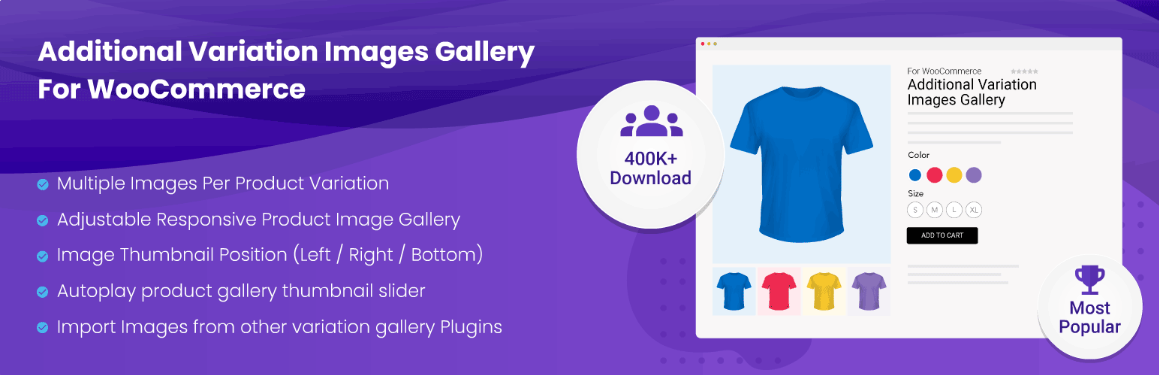
Additional Variation Images Gallery for WooCommerce closes that gap by giving every variation its own full gallery. When a customer selects the red version, the entire gallery switches to red: the front, the back, the close-up of the fabric, and the photo of someone actually wearing it. Select navy and everything changes again. The plugin runs on more than 30,000 stores and holds a 4.6 out of 5 rating.
Upload as many images as each variation needs
There is no limit on the number of images per variation, so you can give the green version ten photos and the blue version twelve. You can select all of them from the media library in one go and then drag them into the order you want. Customers who can see a product from every angle buy with more confidence, and confident customers return less.
Add video where photos fall short
A short clip of a jacket moving or a bag being opened tells customers more than a dozen still images. You can attach YouTube, Vimeo, or self-hosted video to any variation, or set a featured video on simple, variable, grouped, and external products. Version 1.4.0 added video poster support, so your video shows a proper cover image rather than a black rectangle while it loads.
Give customers a closer look, on any screen
Customers can zoom in on stitching and texture or open the image in a lightbox for a full-size view. You control where the thumbnails sit (left, right, or bottom), whether they slide or stack in a grid, and how wide the gallery runs on each screen size. Since most Black Friday browsing happens on a phone, the mobile layout matters more than many store owners expect.
Already using a different gallery tool? Version 1.4.1 includes a migration option, so you can bring your existing gallery data across rather than rebuilding every product by hand. Follow the steps in the documentation, test on a staging site first, and reach out to support if anything looks unexpected.
The offer, and how to claim it
We have kept this deliberately simple. There are no bundles to work out, no “up to” 50% in the small print, and no separate landing page with a countdown clock. One code cuts every price in half, and that is the whole deal.
- Code: FRIDAY50
- Valid: November 1 to December 30, 2026
- Applies to: Both plugins, every yearly and lifetime plan
| Plan | Sites | Normal price (USD) | With FRIDAY50 (USD) |
|---|---|---|---|
| Starter (yearly) | 1 | $49 | $24.50 |
| Business (yearly) | 5 | $149 | $74.50 |
| Developer (yearly) | Unlimited | $299 | $149.50 |
| Starter Lifetime | 1 | $149 | $74.50 |
| Business Lifetime | 5 | $449 | $224.50 |
The prices are the same for Variation Swatches and Variation Gallery. A yearly licence gives you a year of updates and support, while a lifetime licence is a single payment followed by updates and support for as long as you use the plugin.
A friendly suggestion: at half price, a lifetime licence costs less than two years of a yearly plan at the normal rate. If you expect your store to still be running in 2028, lifetime is the better value, and you will not have to think about renewals again.
Claiming the discount takes about a minute
- Open the Variation Swatches or Variation Gallery product page.
- Choose Yearly or Lifetime, select the plan you want, and click Buy Now.
- On the checkout page, enter FRIDAY50 in the coupon field and apply it.
- Check that the total has dropped by half, then complete the payment through 2Checkout.
Our money-back guarantee applies to every purchase, so if the plugin turns out not to be the right fit for your store, simply let us know.
Getting ready before the traffic arrives
Both plugins install in a few minutes, but it is worth setting aside a quiet afternoon before the sale to go through your store the way a customer would. Here is a short checklist to work through.
- Turn on swatches for your shop and category pages
- Set Attribute Behavior to Blur or Hide for sold-out variations
- Enable stock display on products you are running low on
- Add image tooltips to colour and pattern attributes
- Build galleries for your ten best sellers first, then work through the rest
- Add a short video to two or three of your hero products
- Open your store on a phone and complete a purchase from start to finish
If you get stuck at any point, open a support ticket and we will help you sort it out. If you read through our reviews you will notice that people mention the support team more often than any single feature, and we are rather proud of that.
Frequently asked questions
When does the sale end? The FRIDAY50 code works from November 1 to December 30, 2026. After that, prices return to normal.
Does the discount apply to lifetime licences? Yes. The code works on every yearly and lifetime plan, for both plugins.
Can I use the code on both plugins? Yes. Enter the same code at each checkout. You can buy both in one order or separately.
Do I need the premium version to get started? No. Both plugins have free versions on wordpress.org. The premium licence unlocks the shop-page, stock, tooltip, and video features described above, along with premium support.
Can I try before I buy? You can start with the free version, or explore the live demos for Swatches and Gallery. Every purchase is also covered by our money-back guarantee.
Ready for the rush?
Black Friday rewards the stores that make choosing easy, with clear swatches, honest stock counts, and galleries that show every angle of the product. For the next two months, you can add all of that to your store for half the usual price.
Enter FRIDAY50 at checkout before December 30, 2026.
Get Variation Swatches at 50% off · Get Variation Gallery at 50% off

